
One browser.
A conveyor for every file you handle.
Download a torrent, extract it, cut a sample, generate a screenlist, pack into RAR, upload to dozens of file hosts and publish a finished post — in a single automated chain, in the background, at 10 Gbit/s.
How it works
A typical "release posting" scenario in six steps. Each step is a feature or an automation chain.
Download
From a torrent tracker, file host or YouTube. Up to 10 Gbit/s, resume on disconnect, background mode.
Process
Extract archive, cut a video sample, generate a screenlist, build MediaInfo, transcode through FFmpeg.
Pack
Multi-threaded RAR with profiles (compression, volumes, recovery record, password), or ZIP, or ISO.
Upload
In parallel to dozens of file hosts, image hosts and video hosts. Link encryption via filecrypt and others.
Format
Substitute links into a post template: BBCode, HTML or mixed. With images, screenshots, MediaInfo.
Publish
Direct XML-RPC posting to WordPress or DLE. Category, publish date, fields — all from the template.
All six steps fit into one automation plan that runs with a single click and finishes in the background while you do other things.
What is inside
11 working tabs in the interface. Each one is a separate tool with dozens of settings.
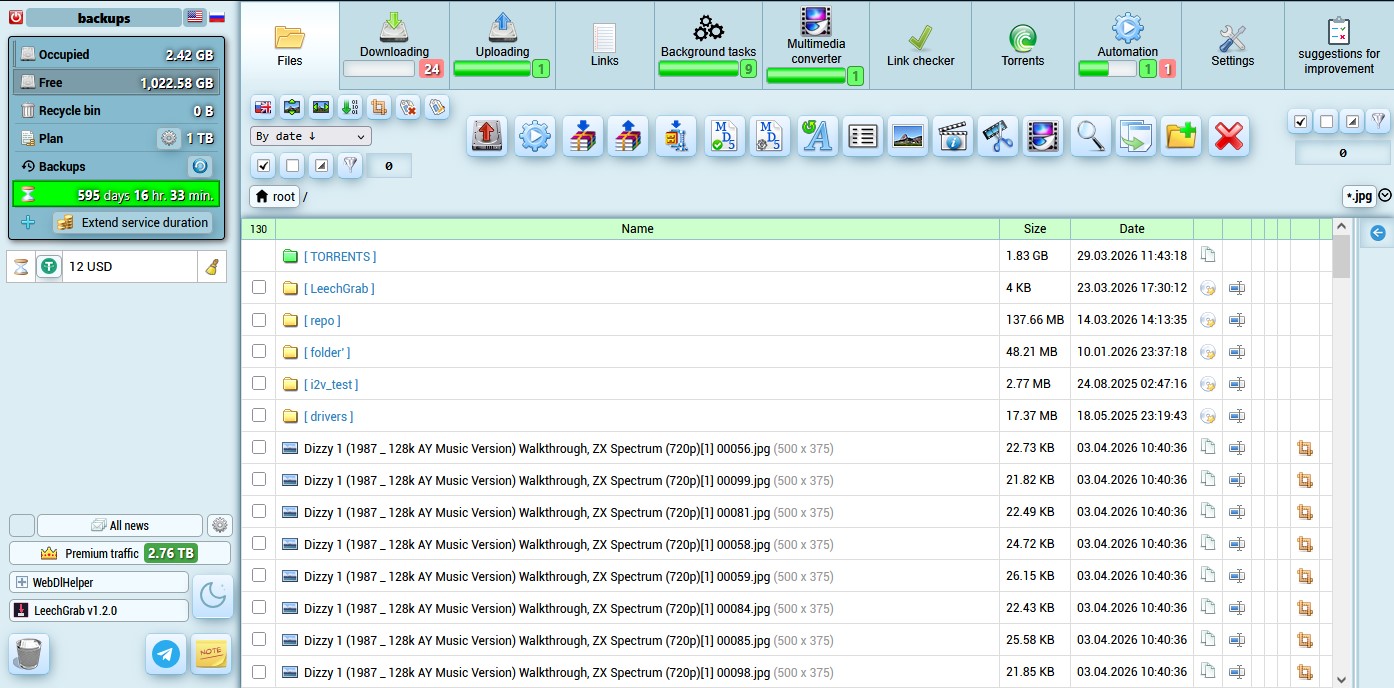
File manager
Folder tree like Windows Explorer. Search, batch rename with regex, batch tag editor, MD5, change MD5, transliterate, image cropper, file joiner, trash with recovery.
Downloads
80+ file hosts: rapidgator, keep2share, nitroflare, fileboom, hitfile, turbobit, mega, google drive, yandex.disk, pixeldrain and more. YouTube — built-in downloader with quality up to 4K. Resume, multi-threading, background mode.
Uploads
100+ services: ~50 file hosts, ~30 image hosts, ~30 video hosts. Parallel streams 6–10. Direct posting to WordPress and DLE via XML-RPC. FTP and FTP folders.
Link manager
Download history, post templates with variables, link encryption via filecrypt.cc, safelinking, dwnld, share-links, bitly, tinyurl. Ready posts in BBCode, HTML or mixed format.
Background tasks
Dedicated tab with progress of every active job. Nothing breaks on connection loss or browser close. Come back in an hour — pick up the finished result.
Media converter
Distributed FFmpeg cluster. Containers mp4/mkv/avi, codecs h264/h265/xvid with the full preset and tune list. Resize, side cropping, image watermarks, audio in opus/aac/mp3/ac3/eac3/vorbis. Build video from images. Saved profiles. Billed by actual processing time.
Link checker
Dedicated tab for batch link health checks. Paste a list — see the status of every link. Grouped per file host, background worker, retry of unknown statuses.
Torrents (ruTorrent)
Full ruTorrent with 19 plugins: RSS auto-add, time scheduler, ratio rules, tracker labels, traffic stats, torrent editor, login manager for private trackers, peer GeoIP, federated tracker search, cookie import. Torrent groups with file pre-selection before adding.
Automation
Visual workflow builder of 34 action types: inputs, downloads, filters, processing, archiving, uploads, post generation, publishing. Conditional logic (if), parallelization (split task), nested plans, encrypted plan export/import with all profiles.
Screenshots and MediaInfo
mtn-based screenlist generator with 40+ profile options: column × row grid, sizes, time stamps, watermarks on every shot or top, aspect-ratio handling. MediaInfo templates with any technical data. Distributed processing across the FFmpeg cluster.
Browser grabber
LeechGrab — a Firefox extension with a MITM proxy on the server. Intercepts any HTTPS download in your browser and routes the file straight to the service, bypassing your computer. Works on sites with no visible direct links.
Use cases
Three typical scenarios where the service pays for itself in the first week.
Release posting
Downloaded from a tracker → extracted → cut a sample → generated a screenlist → packed into RAR with a profile → uploaded to 5 hosts → assembled encrypted links via filecrypt → published a finished post on WordPress. One automation plan, one click.
Re-uploading old archives
List of links to old archives → batch health check → download only the live ones → re-archive with new parameters → upload to fresh hosts → update links on the site. Semi-automated recovery of broken posts.
Media processing
Large source files → distributed FFmpeg transcodes to the codec/container with presets → watermarks applied → previews cut → screenlists built → results uploaded as ready-to-publish posts. No local hardware, billed by actual minutes of CPU.
Pricing
19 daily-billable disk plans from 20 GB to 2 TB and 2 fixed monthly plans. Unlimited traffic. Plan can be changed once a day.
Sold separately
On top of the disk plan — two independent billing streams. Pay only for usage.
Premium traffic
When a file host requires a premium account and you do not have one — buy premium traffic in 10 GB packs and the service will download through its own premium pool. Billed strictly by bytes actually downloaded.
Converter hours
The media converter runs on a distributed FFmpeg cluster. Billing = (multiplier × hourly rate × actual CPU time). The priority multiplier is set by you: higher = faster in queue and more expensive per hour, lower = background and cheaper.
Why this works
14 years in business
Launched in 2011. We have been through every problem a file processing service can have — from file host API changes to new captcha formats.
Real 10 Gbit/s
Downloads, uploads, torrents, FTP, HTTP — real bandwidth everywhere. Not a marketing "up to".
100+ integrations
80+ file hosts for downloads, 100+ for uploads. WordPress, DLE, FTP, YouTube, link encryption via filecrypt and other services. The list is updated every week.
Transparent billing
Three independent billing streams — disk, premium traffic, converter hours. You pay only for what you actually use.
FAQ
What is a "remote file conveyor"?
A remote machine where you work with files in your browser: download from torrents or file hosts, process them (archive, convert, cut, screenshot), upload the result to dozens of services and publish ready-to-go posts on your sites. Your computer and home internet are not used at all.
How is this different from a regular seedbox?
A seedbox only does torrents and basic file management. Here, on top of torrents, you get 80+ file hosts for downloads, 100+ for uploads, a distributed FFmpeg converter, MediaInfo, RAR with profiles, link encryption via filecrypt and others, batch operations, and automation chains of 34 actions with conditional logic and parallelization. A full work cycle, not just downloading.
Do I need my own premium accounts on file hosts?
Not required. Many file hosts work without premium. When premium is required, two options. First — plug your own premium account into the settings, downloads go through it. Second — buy premium traffic from us at $0.36 per 10 GB; the service downloads through its own premium pool and only the bytes actually downloaded are billed.
How much does video conversion cost?
The converter is billed separately. Formula: multiplier × hourly rate × actual CPU time. The priority multiplier is set by you: 1.0 — standard, higher — faster in queue and more expensive, lower — background and cheaper. The UI shows the cost prediction before you start a job. You only pay for actual CPU minutes used.
Can I try without a long commitment?
There is no free trial, but any plan can be paid for 10, 20 or 30 days. The 10-day price is one third of monthly — enough to build your automation chains, try media processing, and decide if the service fits. Plans can be changed every day.
What payment methods are available?
Bitcoin, Litecoin, USDT (7 networks: TRC20, BEP20, Polygon, Optimism, Base, Avalanche, Solana), WebMoney. The pricing page shows the exact amount per payment method.
What happens if my connection drops?
Nothing. Every task — downloads, uploads, archiving, conversion, automation chains, torrents — runs on the server in the background. Close the browser, turn off your computer, come back in an hour and pick up the finished result. A dedicated "Background tasks" tab shows the progress of every process.
How does automation work?
Automation is built around "plans" — sequences of actions. Each action takes a named value (Files, Links, Texts), processes it, and passes the result to the next action. There are 34 action types: inputs, downloads, filters, folder operations, MD5, archiving, media processing, batch rename, uploads, post generation and publishing. There is conditional logic (if-on-files) and parallelization (split task — the plan runs once per file in parallel). Plans can be exported and imported as encrypted packages with all profiles.
Are torrents supported?
Yes, full ruTorrent in a dedicated tab with 19 plugins: RSS auto-add, time scheduler, ratio rules, tracker labels, traffic stats, torrent editor, login manager for private trackers, peer GeoIP, federated tracker search, cookie import. Download up to 10 Gbit/s, seed up to 16 Mbit/s. Torrent groups with file pre-selection before adding.
What about link encryption?
Supported services: filecrypt.cc, safelinking.net, dwnld.net, share-links.biz, bitly.com, tinyurl.com and built-in DLE encryption. Accounts for each service are stored in settings. Used in automation chains when assembling posts: protected containers replace direct links.
Where is the documentation and how do I contact support?
Documentation is linked from the site header and the contacts section below. Support — Telegram (the fastest way) and email. We reply within a few hours during business hours.
Ready to try?
Take any plan for 10 days and see for yourself. If it does not fit — simply do not renew.
Choose a plan →Contacts
The fastest way is Telegram. We reply within a few hours.